
Guest stepper
A guest counter with tactile 3D people, pets and aliens: plus brings the next figurine in, minus sends the last one away, and the count rolls like an odometer.
guest-stepper/guest-stepper.tsx















How many guests can stay here?
Count everyone, little ones and pets included.
The live component, numbered part by part. Every measurement is read from it as it is drawn. Point at a row to outline its part, or at a part to find its row.
When to use
- Counting people for a stay, a table or an event: a small whole number where seeing the group helps people count right.
- A question asked once in a listing or booking flow, given a card of its own, where the figurines make a dull step memorable.
- Ranges from 1 to at most 16 with an open top: the last step reads
16+and stands for “that many or more”. - Counts that move one at a time from a sensible default, so plus and minus are faster than typing.
When not to use
- Several counts side by side (adults, children, infants, pets). Use a compact row of plain steppers, one per kind.
- Large or exact numbers, like a venue’s capacity of 240. Use a number field.
- Dense forms and settings screens: the card takes a whole stage. A plain stepper fits a row.
- Quantities that aren’t people, like rooms or nights: the figurines would say the wrong thing.
- Pages that must stay light: sixteen 3D pictures are loaded with it. Keep it to the one step that deserves them.
You can add this component with the shadcn CLI or by hand:
Into components/guest-stepper of any React project, with no setup:
npx shadcn@latest add https://brunodelorence.com/r/guest-stepper.json- Copy the component files
Copy these files into one folder of your project, keeping their relative imports together, or download them as a ZIP:
- Copy the media files
To the same paths under your project’s public folder:
/experiments/guest-stepper/sage-woman-3d-v1.webp/experiments/guest-stepper/lavender-man-3d-v1.webp/experiments/guest-stepper/shiba-3d-v1.webp/experiments/guest-stepper/mint-alien-3d-v1.webp/experiments/guest-stepper/orange-child-3d-v1.webp/experiments/guest-stepper/cream-cat-3d-v1.webp/experiments/guest-stepper/coral-woman-3d-v1.webp/experiments/guest-stepper/blue-alien-3d-v1.webp/experiments/guest-stepper/cream-man-3d-v1.webp/experiments/guest-stepper/corgi-3d-v1.webp/experiments/guest-stepper/teal-grandmother-3d-v1.webp/experiments/guest-stepper/penguin-3d-v1.webp/experiments/guest-stepper/lilac-alien-3d-v1.webp/experiments/guest-stepper/yellow-man-3d-v1.webp/experiments/guest-stepper/rabbit-3d-v1.webp/experiments/guest-stepper/coral-alien-3d-v1.webp/experiments/guest-stepper/llama-3d-v1.webp
- Import it
As shown under Usage, below.
Either way it needs React 19 and a bundler that supports CSS Modules, such as Next.js or Vite. It has a dark colour scheme: it follows your page’s color-scheme, light unless the page sets one, or its colorScheme prop, with nothing to configure. Browsers without light-dark() show it light.
Usage
import { GuestStepper } from './guest-stepper';export function ListingGuests({ save }: { save: (guests: number) => void }) { return ( <GuestStepper defaultGuests={2} question="How many guests can stay here?" onChange={save} autoplay={false} /> );}Each state below is a live instance, locked so you can study it.
The pieces it is built from, each with its measurements read live.
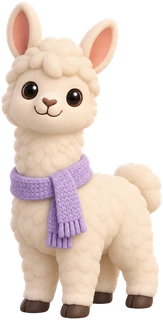
A counter for how many guests a place can host, with sixteen rounded 3D figurines: people, dogs, a cat, a rabbit, a penguin and friendly aliens. Soft materials and studio lighting give each one a tactile finish. New guests hop in as silhouettes and fill with colour from the feet up, while the line re-centres and shrinks to fit the card. At the top the count reads 16+ and a 3D llama joins the back of the line.
- Each figurine is an optimised transparent WebP with consistent 3D materials, lighting and camera angle. Its width and height come from the character’s silhouette, with every set of feet resting on the same baseline. People, animals and aliens already appear in the first four guests.
- Each guest has a fixed place along the line, a little closer than their width to the one before. The line slides back by half its width to stay centred and scales down when it is wider than the row; CSS works out that scale from the row’s width in container query units, so the whole line moves as one transform on a spring.
- A guest who joins hops in from the side as a silhouette, and their colours fill in from the feet up with a clip-path; several joining at once come in one after another. A guest who leaves steps aside, fades and hides.
- The number is an odometer: each digit is a column of digits behind a window that rolls to the new digit, up as the count grows and down as it shrinks. Past 9 a tens digit fades in, at the top a “+” joins, and the glyphs glide to stay centred.
- Every second or two, while the line is on screen, one person or pet gently shifts their weight, or an alien floats a little. Each is one short Web Animation; idle motion stops offscreen, in hidden tabs and under reduced motion.
- Every colour is a light-dark() token on the root, so it follows the page’s color-scheme, or the colorScheme prop. Only the card, the controls, the floor, the shadows and the arriving silhouette change; the figurine renders never do.
| Prop | Type | Default | Description |
|---|---|---|---|
defaultGuests | number | 4 | The count at first, from 1 to max. |
defaultOpen | boolean | true | Whether the card starts open; false starts it folded into its pill, with the demo off. |
max | number | 16 | The most guests, 2 to 16: the count shows it as “16+”, plus is disabled and the llama joins the line. |
question | string | 'How many guests can stay here?' | The question over the count, and the spinbutton’s accessible name. |
hint | string | 'Count everyone, little ones and pets included.' | The line under the question. |
onChange | (guests: number) => void | — | Called with the new count after each change. |
onClose | (guests: number) => void | — | Called with the count when the card is closed. |
autoplay | boolean | true | While on screen and untouched, a demo pointer steps the count up, down, to the top and back. |
colorScheme | 'light' | 'dark' | 'system' | — | Its colours: light, dark, or the reader’s system setting. Without it the component follows the page’s color-scheme, which is light unless the page sets one. |
className | string | — | Extra class for the root, a stage of its own. |
The complete source behind this demo. Open source under the MIT license, © 2026 Bruno Delorence: copy it, change it, ship it.
// Copyright (c) 2026 Bruno Delorence. MIT License.'use client';import { useEffect, useId, useLayoutEffect, useRef, useState, type CSSProperties, type KeyboardEvent,} from 'react';import { GhostPointer, runDemo } from './ghost-pointer';import { EXTRA, Figure, GUESTS, widthOf, type Guest } from './guests';import { Odometer } from './odometer';import { spring } from './spring';import { useAutoplay } from './use-autoplay';import { useIdle } from './use-idle';import styles from './guest-stepper.module.css';/* * Guest stepper: how many guests a place can host, counted on a line of 3D figurines. Each * guest is a character standing in line: plus brings the next one in at the end, minus sends the/* Guest stepper (guest-stepper.tsx, odometer.tsx). Sizes are in em: the stage sets the font-size from its own width (a container query). The guests are drawn in px, a unit each, and the line scales them down to fit. --glide and --glide-ms, the spring the line moves on, come from the component. Colours are the tokens below, light-dark(light, dark): the component takes the color-scheme it inherits from the page (light unless the page says otherwise), or the one its colorScheme prop sets (data-color-scheme). The figurines are pictures and stay as they are; at night only what is round them goes dark. */.root { /* The stage and its dots; the card, and the pill it closes into, a step up. */ --surface: #e7e7ea; --dots: rgb(0 0 0 / 0.05); --surface-2: #fff; /* The words and the count; the hint, Close's cross, the plus sign and Edit. */ --ink: #1c1c1e; --ink-muted: #6e6e73; /* Close and Edit, then Close under the pointer. */ --control: #f2f2f5; --control-hover: #e9e9ee; /* Minus and plus: their ring, then under the pointer. */ --step-ring: #d9d9df; --step-ring-hover: #b9b9c1;/** Transparent 3D figurines. Keep /experiments/guest-stepper alongside the copied component. */export type Guest = { id: string; kind: 'person' | 'animal' | 'alien'; src: string; /** The figure's size in the unscaled line, with its feet on the common baseline. */ width: number; height: number;};const guest = (id: string, kind: Guest['kind'], width: number, height: number): Guest => ({ id, kind, src: `/experiments/guest-stepper/${id}-3d-v1.webp`, width, height,});/** People, pets and visitors from space; all three are visible in the initial group of four. */export const GUESTS: readonly Guest[] = [ guest('sage-woman', 'person', 53, 98), guest('lavender-man', 'person', 50, 98), guest('shiba', 'animal', 58, 76), guest('mint-alien', 'alien', 52, 90),import { useLayoutEffect, useRef } from 'react';import { easingOf, spring } from './spring';import styles from './guest-stepper.module.css';/* * The big number, as an odometer. Each digit is a column of digits behind a window: when the * number changes, the columns whose digit changed roll to the new one, up as the number grows and * down as it shrinks, through 9 and 0 as a counter's wheels do. Past 9 a tens digit fades in * beside the ones; at the top of the range a "+" joins them; the number stays centred, its glyphs * gliding to their new places. *//** Each column holds the digits three times over, so it can roll on past 9, or back past 0. */const DIGITS = Array.from({ length: 30 }, (_, i) => i % 10);/** A digit's height and width, and the "+"'s width, in em. */const LINE = 1.15;const DIGIT = 0.62;const PLUS = 0.56;const ROLL = spring(0.22, 360);/** Where a column's strip rests to show `digit`: in its middle round. */const rest = (digit: number) => `translateY(${-(10 + digit) * LINE}em)`;'use client';import { useEffect, type RefObject } from 'react';/* * The figurines' idle life: every second or two, one guest shifts their weight or gently bobs. * Each gesture is one short Web Animation, * and nothing runs between them. It goes on only while the line is on screen in a visible tab, * and never under reduced motion. * * [data-shown] finds guests in line; [data-body] is the figurine that moves. Aliens float a * little; people and pets sway around their feet. The transparent artwork stays intact. */export function useIdle(root: RefObject<HTMLElement | null>, enabled = true) { useEffect(() => { const element = root.current; if (!element || !enabled) return; const motion = window.matchMedia('(prefers-reduced-motion: reduce)'); let onScreen = false; let timer = 0; let active: Animation | undefined; const gesture = () => { const bodies = element.querySelectorAll<HTMLElement>('[data-shown] [data-body]');/* * Springs as CSS easings. A spring pulls a value to its target and lets it settle: fast at first, * then slowing down, overshooting a little and coming back if it is bouncy. CSS `linear()` draws * any curve through a list of points, so the spring's motion is sampled once, and the same curve * serves CSS transitions and the Web Animations API. */export type Spring = { /** The curve, as a CSS `linear()` easing. */ easing: string; /** How long it takes to settle, in ms: the duration to play the curve over. */ duration: number;};/** Points sampled along the curve: plenty for a smooth motion. */const SAMPLES = 40;/** * A spring that covers most of the distance in about `response` ms. With a `bounce` of 0 it * settles without overshooting; at 0.3 it overshoots by about 5% and comes back. */export function spring(bounce: number, response: number): Spring { // The damping ratio (1: no overshoot) and the natural frequency, in radians per second. const damping = 1 - bounce;'use client';import type { CSSProperties, Ref } from 'react';/* * The demo's ghost pointer, and the timeline that moves it. A demo is a script of awaited steps: * wait, glide the pointer onto a control, press it and call the component's own handler, as a * click would. Stopping the demo (the reader takes over, or it scrolls away) ends the step in * progress at once: its promise rejects, which ends the script right there, and the pointer * fades out. */export type Demo = { /** Resolves after `ms`. */ wait: (ms: number) => Promise<void>; /** Glides the pointer onto `target`: its middle, or a point given as shares of its size. */ moveTo: (target: Element | null | undefined, at?: { x: number; y: number }) => Promise<void>; /** Presses and lets go; `action` runs as the pointer goes down. */ press: (action: () => void) => Promise<void>;};/** What a stopped demo's pending step rejects with. */class Stopped extends Error {}'use client';import { useCallback, useEffect, useRef, useState } from 'react';/* * When a demo may play on its own: while part of it is on screen and the tab is visible, never * under reduced motion, and not while the reader is using it. `take()` hands it to the reader; it * takes back over `idle` ms after their last input. */export function useAutoplay<T extends HTMLElement>(idle = 6000) { const ref = useRef<T>(null); const [visible, setVisible] = useState(false); const [reduced, setReduced] = useState(true); const [taken, setTaken] = useState(false); const timer = useRef(0); useEffect(() => { const element = ref.current; if (!element) return; let onScreen = false; const update = () => setVisible(onScreen && !document.hidden); const observer = new IntersectionObserver( ([entry]) => { onScreen = entry.isIntersecting;- The count is a spinbutton named by the question, its value spoken as “8 guests” (“16 or more guests” at the top): the arrow keys step it, Page Up and Page Down move it by five, and Home and End go to the limits.
- Remove a guest and Add a guest are labelled buttons, marked aria-disabled at the limits so focus stays on them. Changes are announced (“8 guests.”), and a press at a limit says so (“At least 1 guest.”).
- The characters are decorative and hidden from screen readers. Close folds the card into a pill (“Edit the guests: 8 guests”) that takes the focus and opens the card again.
- Under reduced motion guests appear and leave at once, nobody idles, the number changes without rolling, and the demo does not play.