

Overview / Meli+
Meli+: more subscribers, fewer lost to a failed payment.
A redesign proposal for Meli+, the subscription that bundles Mercado Livre and Mercado Pago benefits. I redesigned the landing where new subscribers choose a plan, and drew the journey that adds a backup card, so that a failed charge does not cancel the subscription, in two iterations.
At a glance Bruno Delorence redesigned two parts of Meli+, the benefits subscription of Mercado Livre and Mercado Pago, in its mobile app: the landing where new subscribers choose between Meli+ Essencial (R$9,90 a month) and Meli+ Total (R$17,90), and a backup payment method that keeps a subscription active when the main card fails. The case shows the brief, the original screens and the redesign, the backup-card journey in two iterations, and adding a new card by scanning it or typing it in.
Essencial and Total, one slide each
R$9,90 and R$17,90 a monthAn email, a notification and the subscription page
To add a backup cardThree journeys, the first in two iterations
On the Figma journey boardCounted in the Figma file.
00 / The brief
Two goals: more subscribers, fewer lapses.
Meli+ is a monthly subscription with two plans: shipping, instalment and cashback benefits on every purchase, and, in the second, streaming as well. The brief asked for a landing that helps people choose a plan, and for a way to add a backup payment method, so that a failed charge does not cancel the subscription.
The initiative
Meli+ is the new benefits programme of Mercado Livre and Mercado Pago: a monthly subscription with two plans.
- The first gives, on every purchase, shipping benefits, extra interest-free instalments and cashback in crypto.
- The second keeps those benefits and adds well-known streaming platforms, with large promotional discounts.
Business goals
- Bring in new Meli+ subscribers.
- Reduce involuntary cancellations caused by payment problems: a failed or missing charge.
Experience goals
- Landing: subscribers choose the benefits plan that suits them best.
- Subscription management: subscribers add a backup payment method.
The starting point
A proposal to iterate on.
The brief came with the current landing and a flow of about ten screens for the backup card: an email, a notification, a coachmark, the list of payment methods. The redesign starts from them.
Inside the app
The same app, a different flow.
The screens keep Mercado Livre’s yellow header and Mercado Pago’s blue actions. What changes is the order, the layout and the words.
01 / New subscribers
One plan at a time.
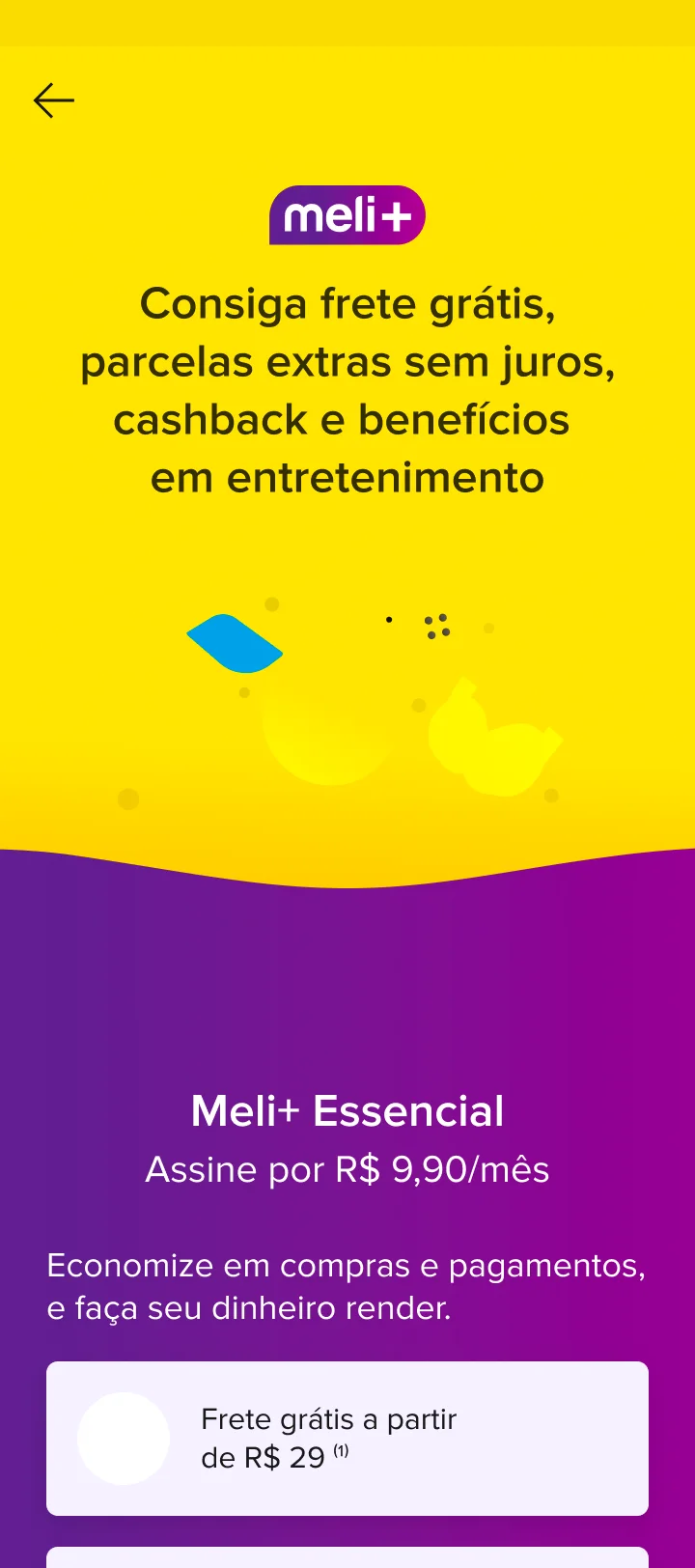
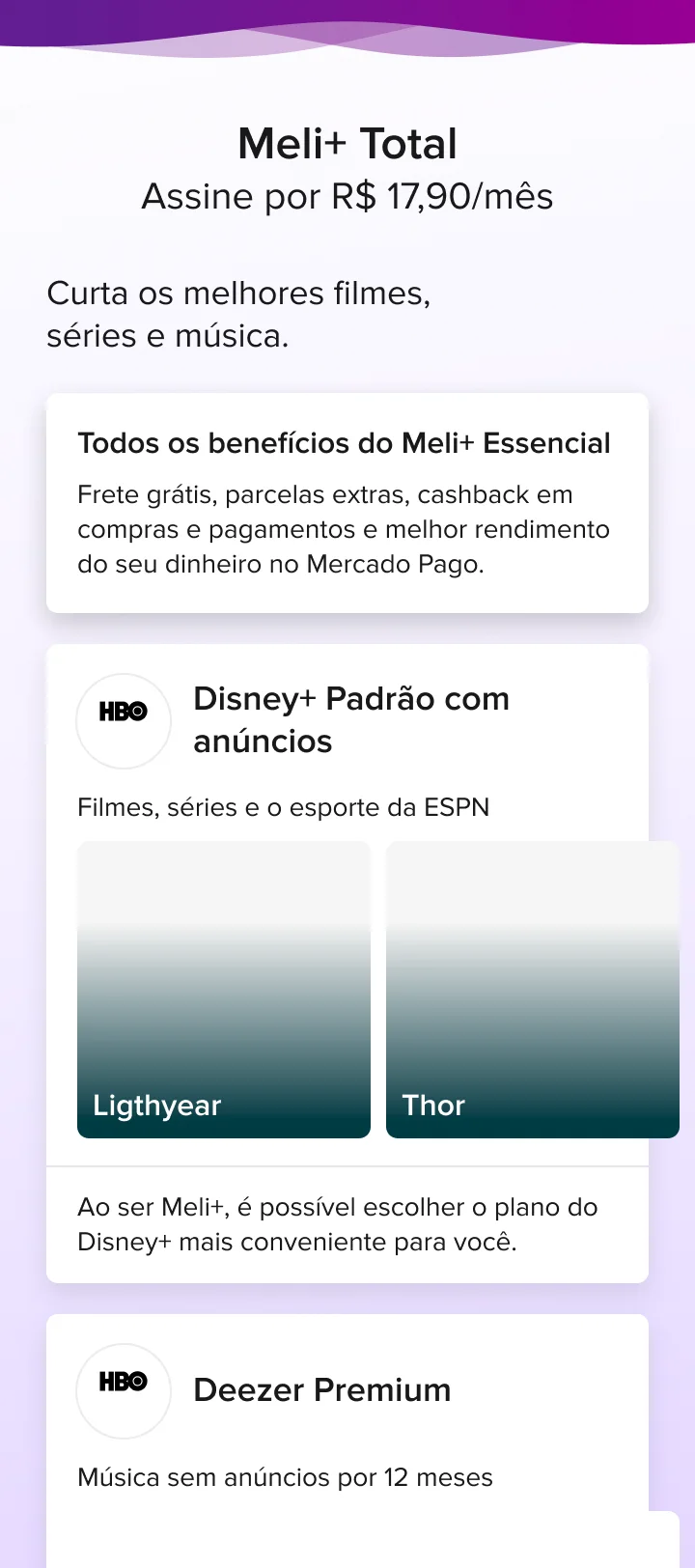
The original landing was one long page: a hero, then both plans and everything they include, one after the other. The redesign splits it into three slides: what Meli+ is, then one plan per slide, with its price, its benefits and one button.
In short
- What Meli+ is, on a slide of its own, with one button: see the plans.
- One plan per slide: the price, what it includes, and “Escolher esse plano”.
- Total’s streaming and discounts, listed with their logos.
Goal More new Meli+ subscribers
[1.0]Apresentação [1.0]

Frete grátis, parcelas extras sem juros, cashback e benefícios
Economize em compras e pagamentos, e faça seu dinheiro render.
Veja os planos disponíveis

Meli+ Essencial [1.0]
Meli+ Essencial
Economize em compras e pagamentos, e faça seu dinheiro render.
R$9,90 por mês
Escolher esse plano
Frete grátis a partir
de R$ 29*

Até 3 parcelas extras
sem juros
Cashback em compras
e pagamentos
Seu dinheiro rende mais no
Mercado PagoMeli+ Total [1.0]
Meli+ Total
Economize em compras e pagamentos, e faça seu dinheiro render.
R$17,90 por mês

Todos os benefícios do Meli+ Essencial
Frete grátis, parcelas extras, cashback em compras e pagamentos e melhor rendimento do seu dinheiro no Mercado Pago.
Agora com muito mais entretenimento
Curta os melhores filmes, séries e música.
 Meli+ Total
Disney+ Padrão com anúncios
Ao ser Meli+, é possível escolher o plano do Disney+ mais conveniente para você.
 Meli+ Total
Deezer Premium
Música sem anúncios por 12 meses
Descontos em outras plataformas
de conteúdoEscolher esse plano
HBO MAX
30% OFF
Paramount+
30% OFF
VIX Premium
30% OFF

Frete grátis, parcelas extras sem juros, cashback e benefícios
Economize em compras e pagamentos, e faça seu dinheiro render.
Veja os planos disponíveisMeli+ Total
Economize em compras e pagamentos, e faça seu dinheiro render.
R$17,90 por mês
Todos os benefícios do Meli+ Essencial
Frete grátis, parcelas extras, cashback em compras e pagamentos e melhor rendimento do seu dinheiro no Mercado Pago.
Agora com muito mais entretenimento
Curta os melhores filmes, séries e música.
Meli+ TotalDisney+ Padrão com anúncios
Ao ser Meli+, é possível escolher o plano do Disney+ mais conveniente para você.
Meli+ TotalDeezer Premium
Música sem anúncios por 12 meses
Descontos em outras plataformas
de conteúdo
HBO MAX
30% OFF
Paramount+
30% OFF
VIX Premium
30% OFF
02 / The backup card
A failed payment shouldn’t end a subscription.
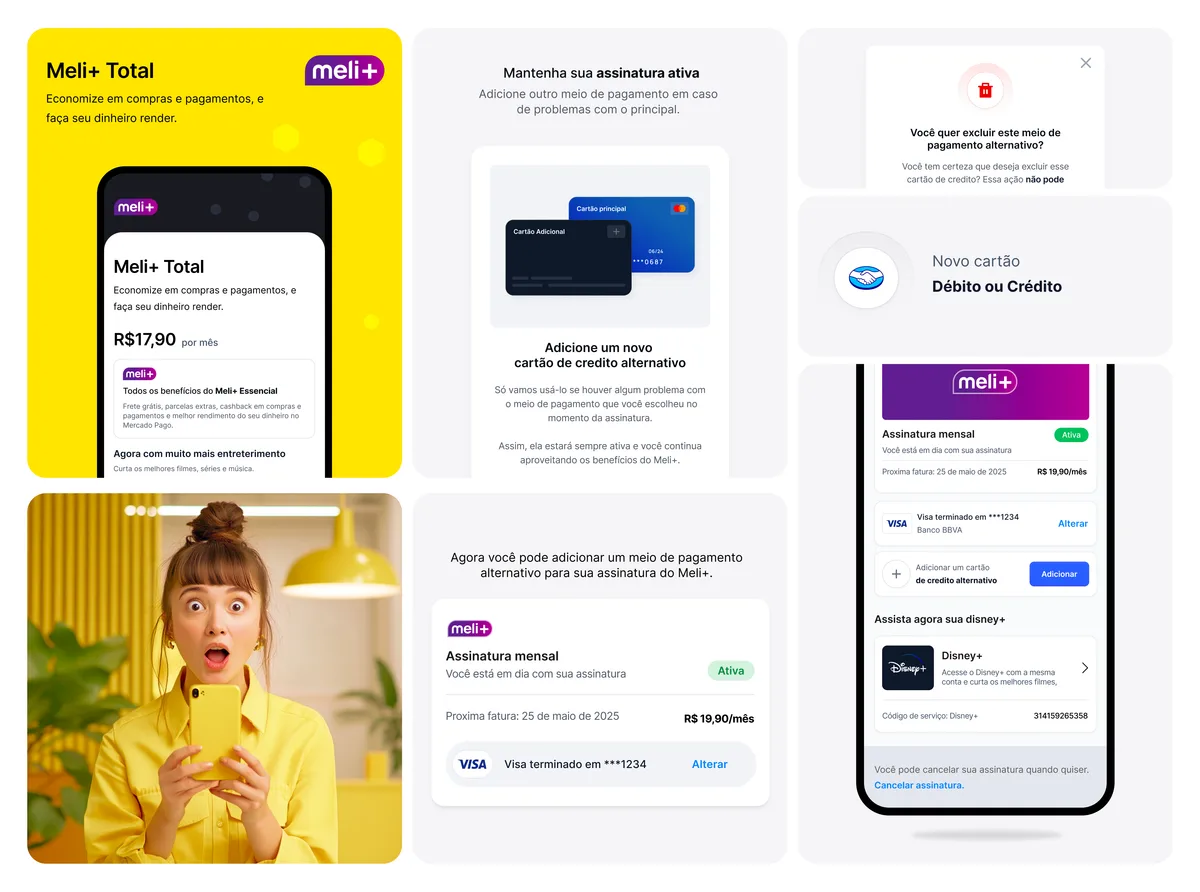
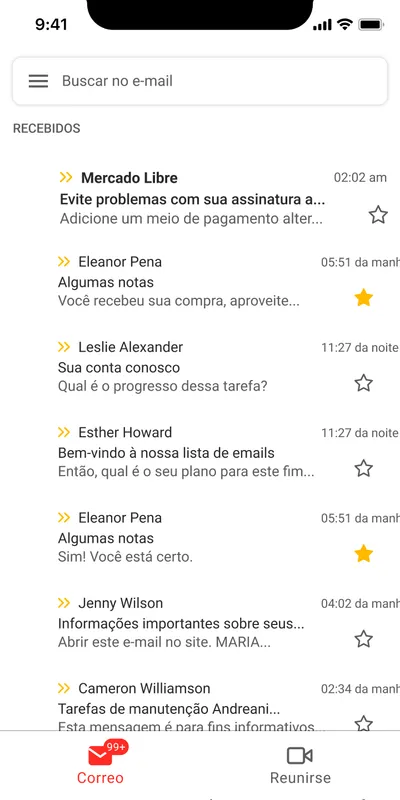
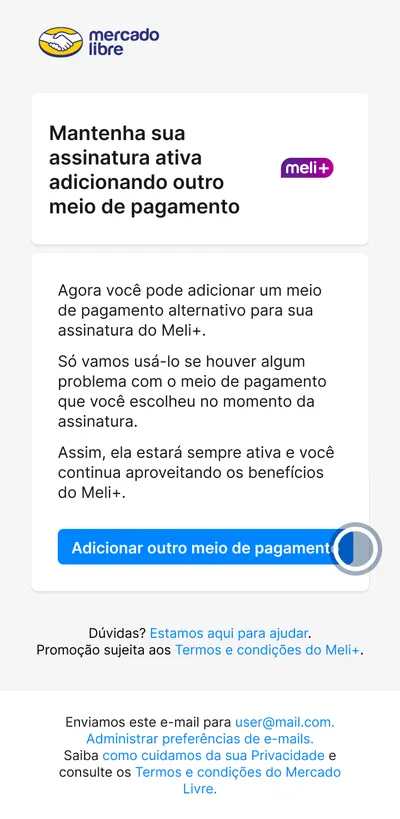
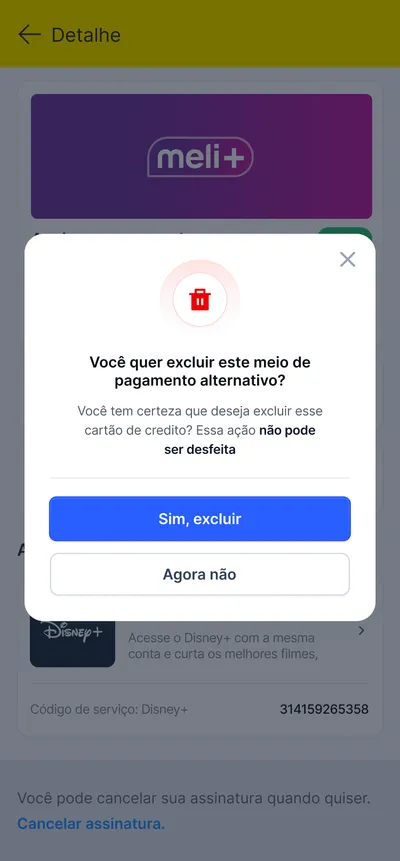
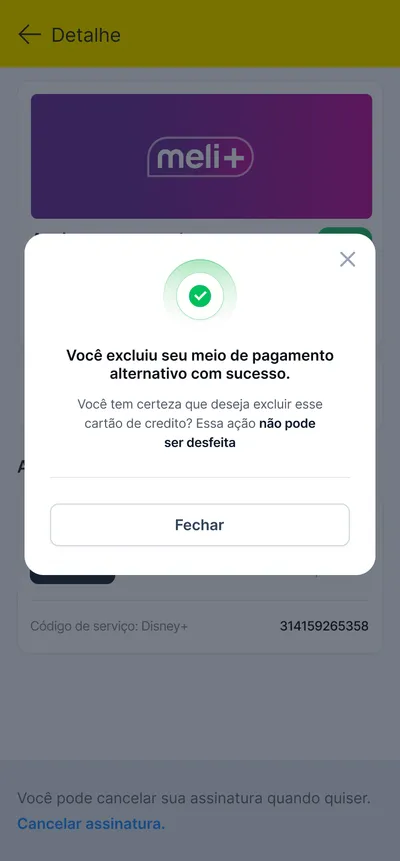
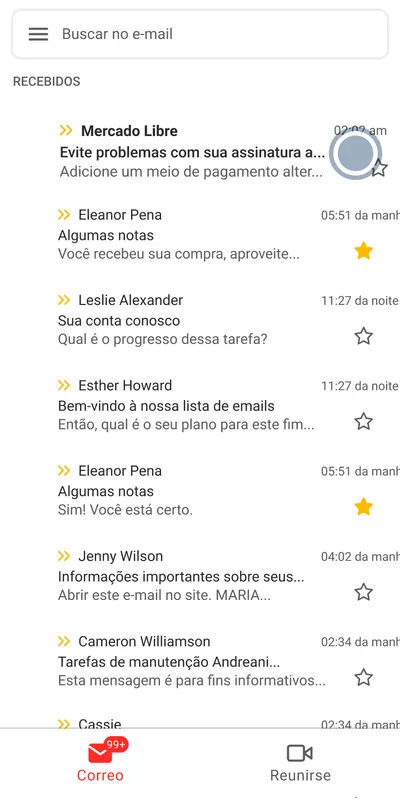
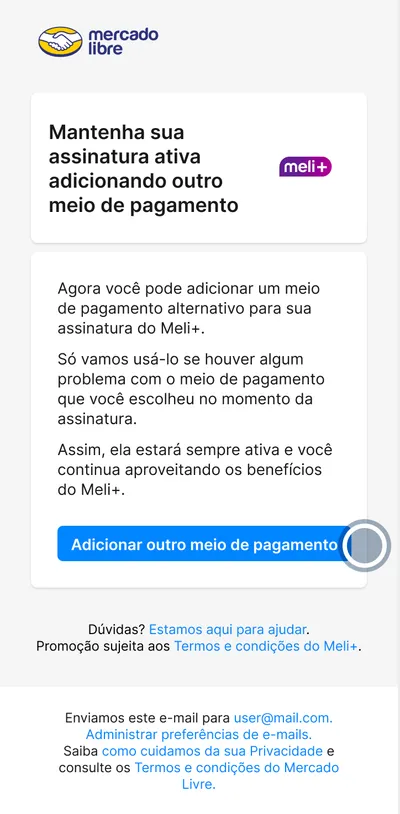
When the main card fails, Meli+ can charge a backup one. The journey invites subscribers to add it from three places, an email, a notification and the subscription page, and lets them change or delete it later.
In short
- Three ways in: an email, a notification, the subscription page.
- A backup card from a new card, a saved one, or the Mercado Pago balance.
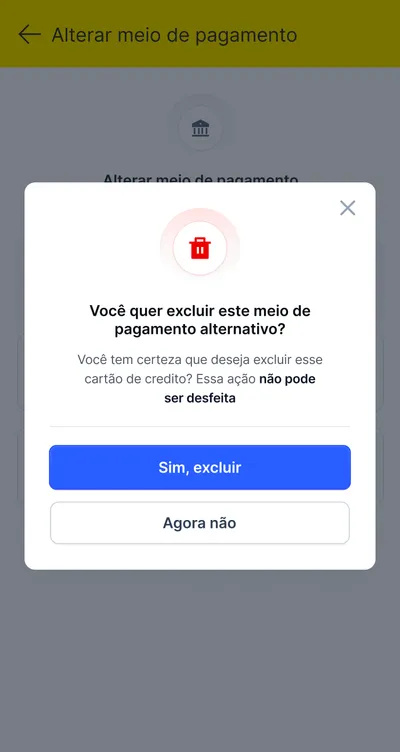
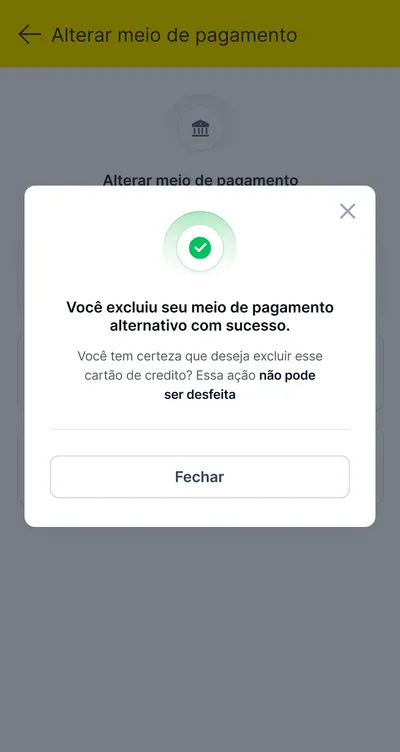
- Change or delete it any time; deleting asks first.
How might a failed payment never cancel a subscription?
Goal Fewer involuntary cancellations from failed payments
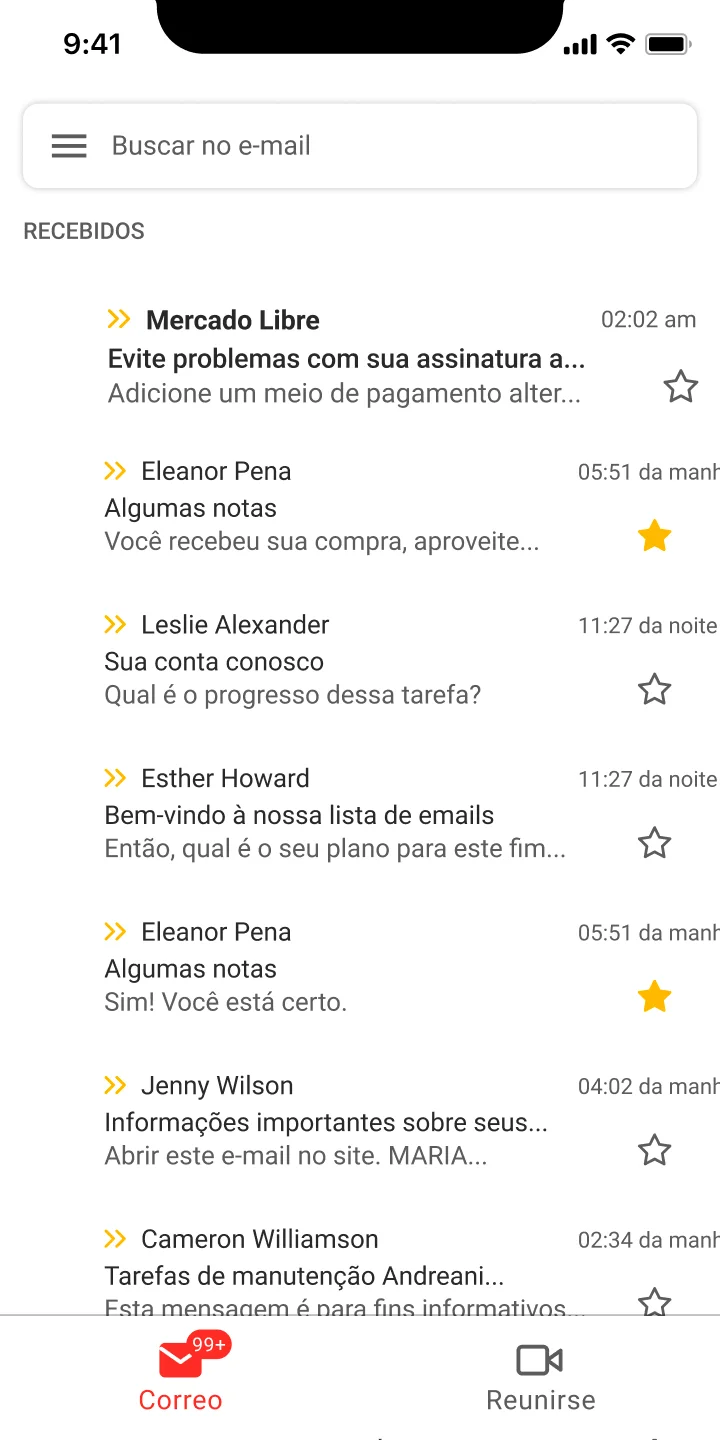
Step 1 of 10 · 1.0
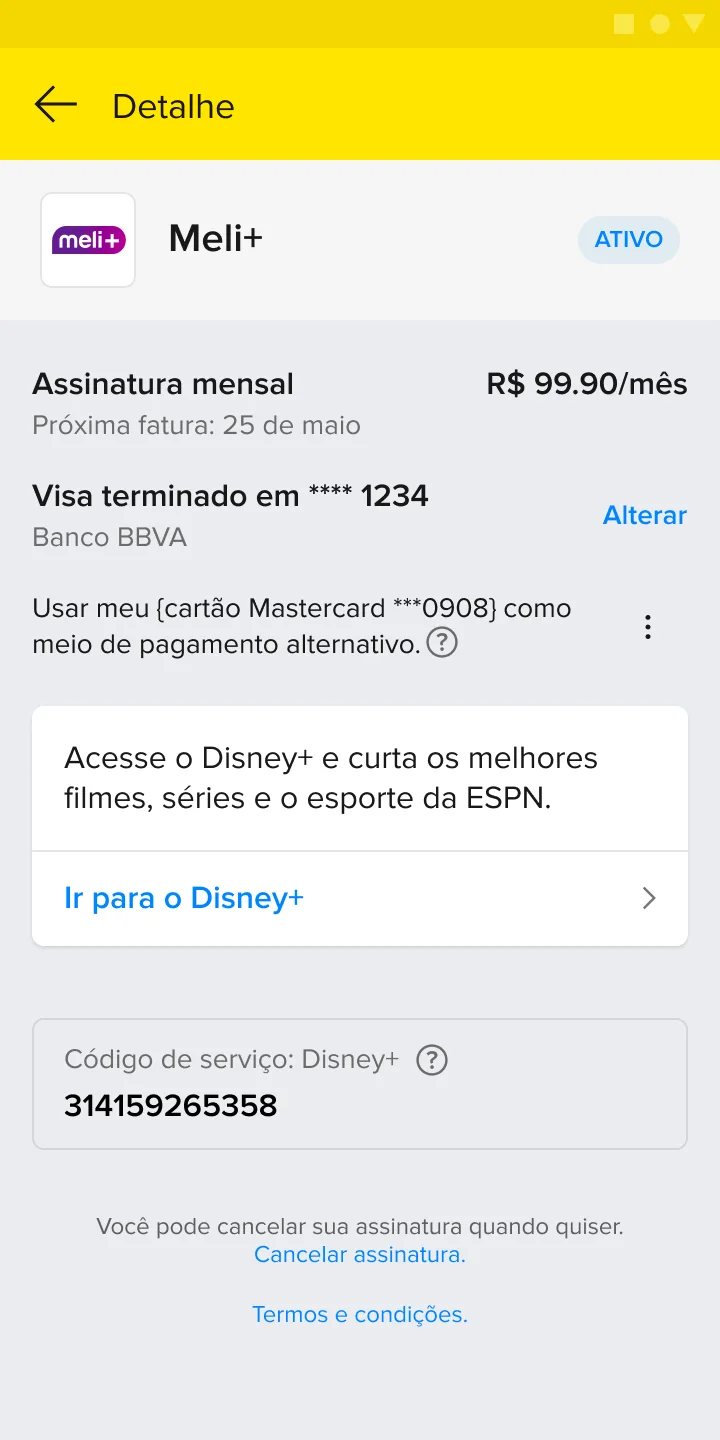
An email warns that the Meli+ subscription could stop if a payment fails.
03 / Two iterations
From layers to pages.
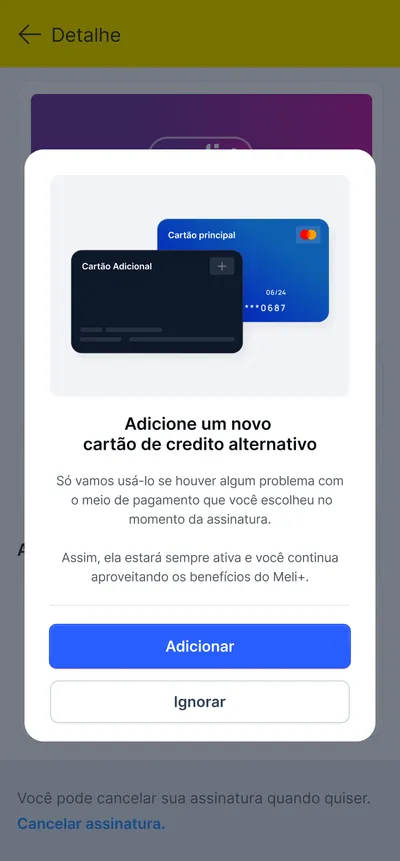
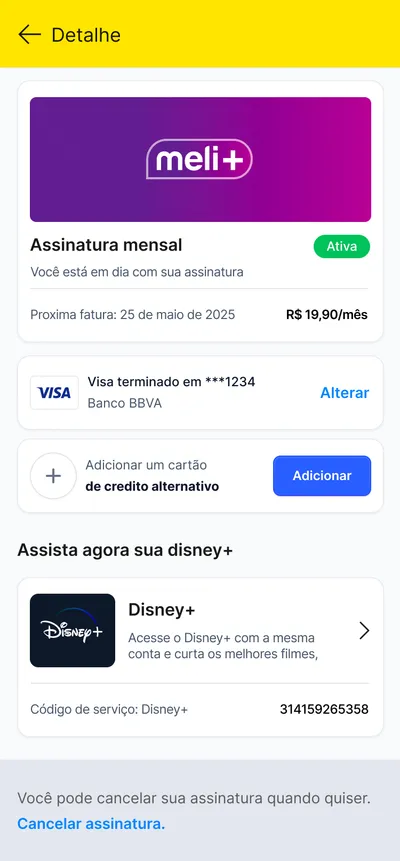
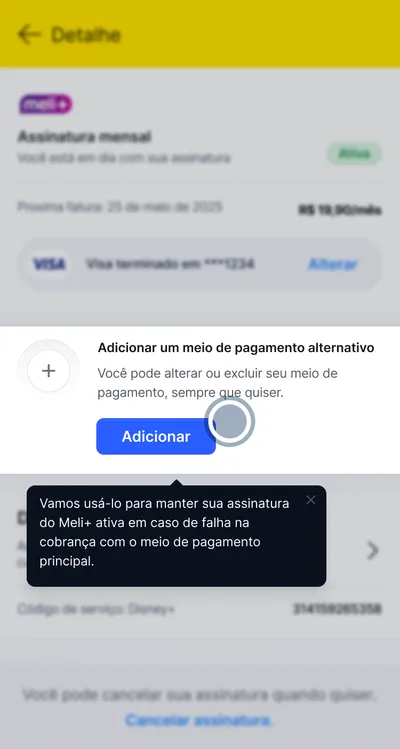
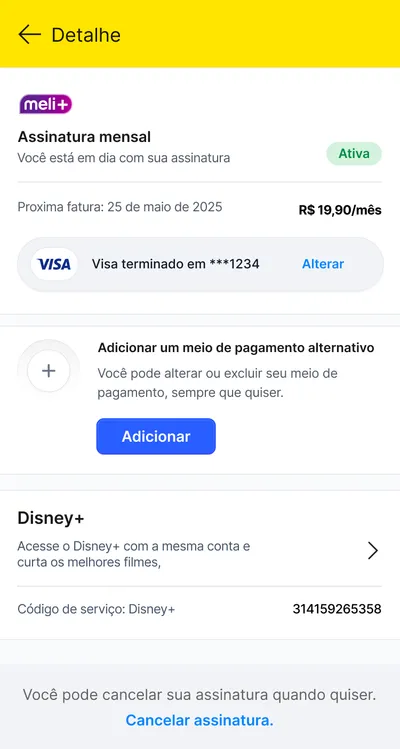
The first iteration layered the flow over the subscription page: a modal, then bottom sheets. The second flattened it: a spotlight and a tooltip instead of the modal, full pages instead of sheets, plain white sections instead of floating cards.
 Detalhe
Assinatura mensalVocê está em dia com sua assinatura
AtivaPróxima fatura: 25 de maio de 2025R$ 19,90/mês
 Visa terminado em ***1234Alterar
Adicionar um meio de pagamento alternativo
Você pode alterar ou excluir seu meio de pagamento, sempre que quiser.
AdicionarDisney+Acesse o Disney+ com a mesma conta e curta os melhores filmes,

Código de serviço: Disney+ 314159265358
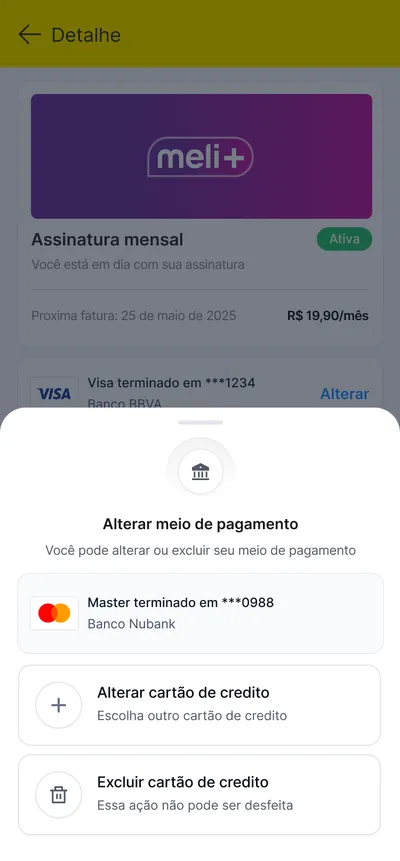
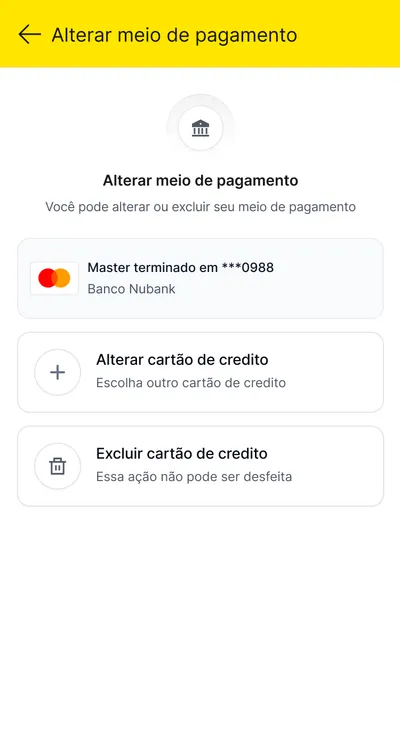
Alterar meio de pagamento
Alterar meio de pagamento
Você pode alterar ou excluir seu meio de pagamento

Master terminado em ***0988Banco Nubank
Alterar cartão de créditoEscolha outro cartão de crédito

Excluir cartão de créditoEssa ação não pode ser desfeita
DetalheAssinatura mensalAtiva
Você está em dia com sua assinatura
Próxima fatura: 25 de maio de 2025R$ 19,90/mês

Visa terminado em ***1234Banco BBVA
AlterarAdicionar um cartãode crédito alternativo
AdicionarAssista agora sua Disney+
Disney+Acesse o Disney+ com a mesma conta e curta os melhores filmes,
Código de serviço: Disney+ 314159265358
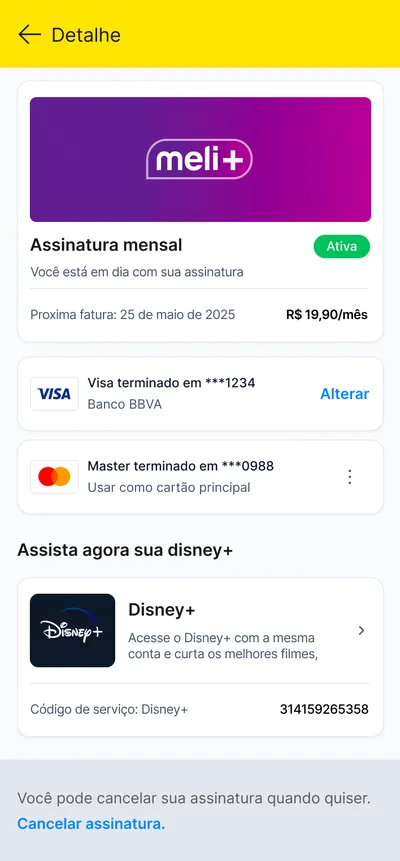
DetalheAssinatura mensalAtiva
Você está em dia com sua assinatura
Próxima fatura: 25 de maio de 2025R$ 19,90/mês
Visa terminado em ***1234Banco BBVA
AlterarMaster terminado em ***0988Usar como cartão principal

Assista agora sua Disney+
Disney+Acesse o Disney+ com a mesma conta e curta os melhores filmes,
Código de serviço: Disney+ 314159265358
Alterar meio de pagamento
Você pode alterar ou excluir seu meio de pagamento
Master terminado em ***0988Banco Nubank
Alterar cartão de créditoEscolha outro cartão de crédito
Excluir cartão de créditoEssa ação não pode ser desfeita
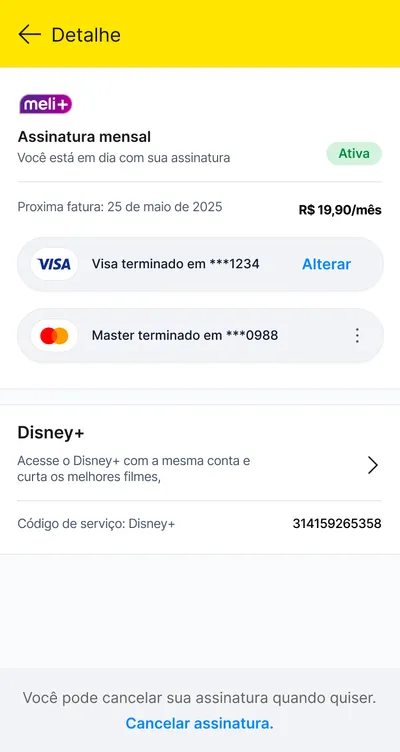
DetalheAssinatura mensalVocê está em dia com sua assinatura
AtivaPróxima fatura: 25 de maio de 2025R$ 19,90/mês
Visa terminado em ***1234AlterarMaster terminado em ***0988Disney+Acesse o Disney+ com a mesma conta e curta os melhores filmes,
Código de serviço: Disney+ 314159265358
What 2.0 changed
A page for each task.
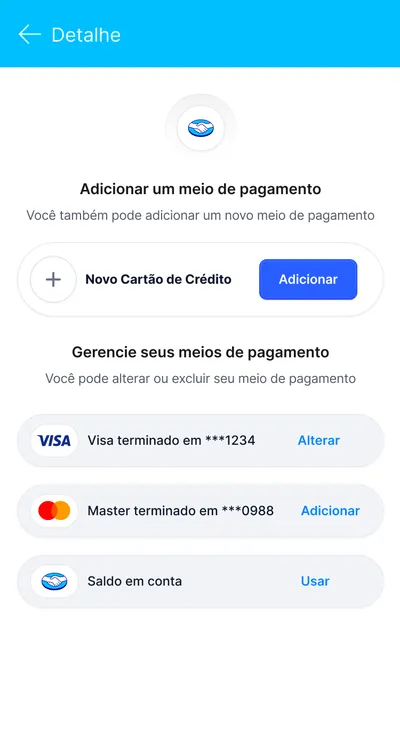
Adding a card and changing one each open a page of their own, in place of a sheet over the subscription page.
What stayed
The same safeguard.
In both iterations, deleting the backup card asks first, and says it cannot be undone.
04 / A new card
Scan the card, or type it.
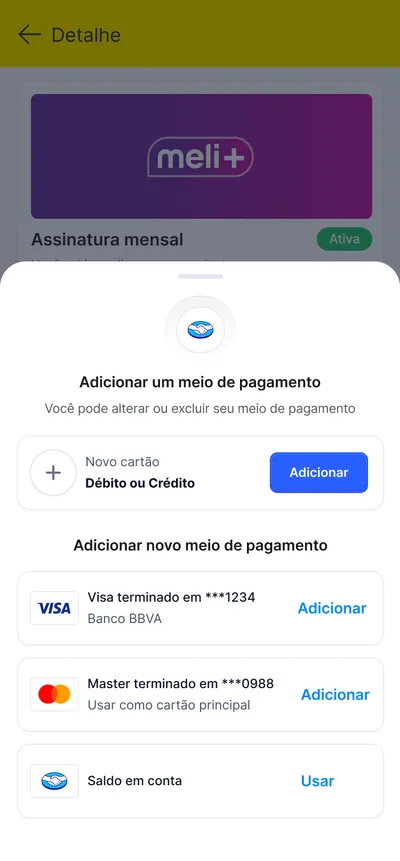
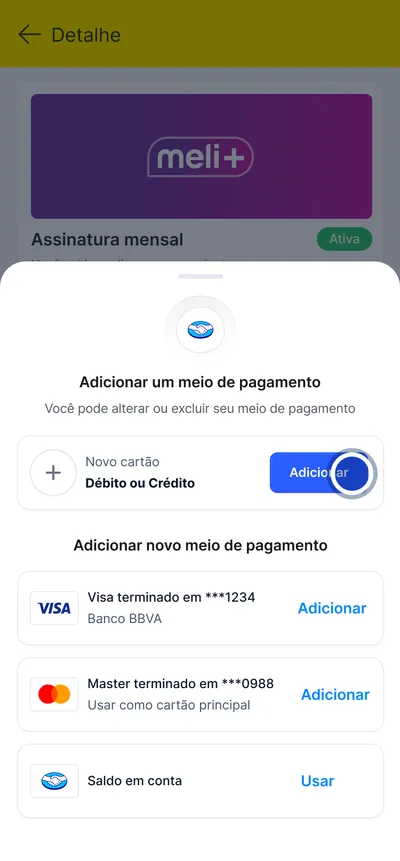
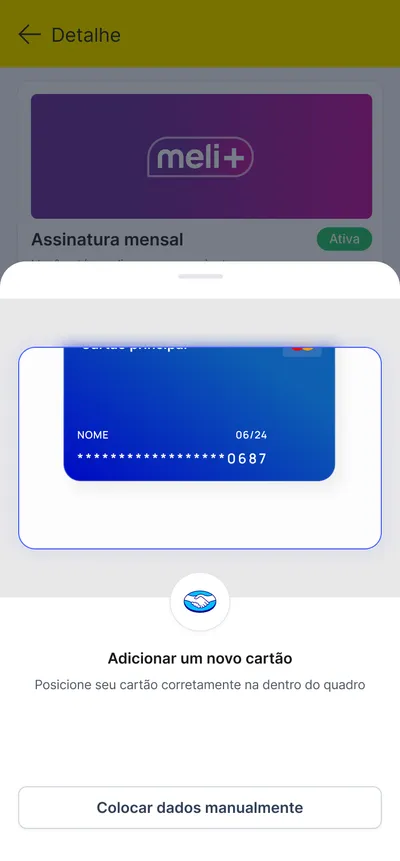
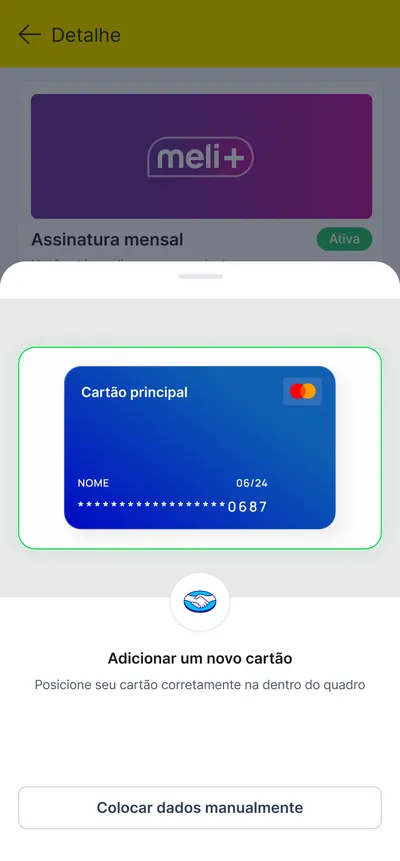
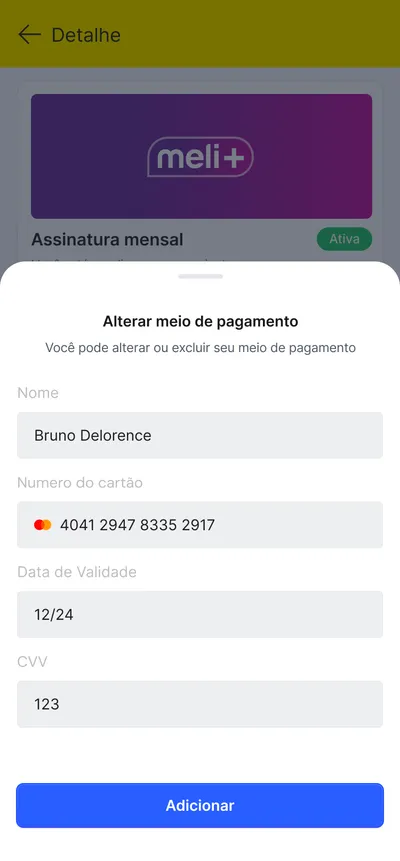
Adding a new card starts from the sheet of payment methods. The camera frames the card and turns green once it fits; the details can also be typed in by hand.
How to add a new credit card
[3.0]DetalheAssinatura mensalAtiva
Você está em dia com sua assinatura
Próxima fatura: 25 de maio de 2025R$ 19,90/mês
Visa terminado em ***1234Banco BBVA
AlterarAdicionar um cartãode crédito alternativo
AdicionarAssista agora sua Disney+
Disney+Acesse o Disney+ com a mesma conta e curta os melhores filmes,
Código de serviço: Disney+ 314159265358

Adicionar um meio de pagamento
Você pode alterar ou excluir seu meio de pagamento
Novo cartãoDébito ou Crédito
AdicionarAdicionar novo meio de pagamento
Visa terminado em ***1234Banco BBVA
AdicionarMaster terminado em ***0988Usar como cartão principal
AdicionarSaldo em conta
Usar- 01Novo cartão
In the sheet of payment methods, “Novo cartão” opens the camera.
- 02Scan
The camera frames the card, and the frame turns green once it fits.
- 03Type it in
Or the details are typed by hand: name, number, expiry date and CVV.
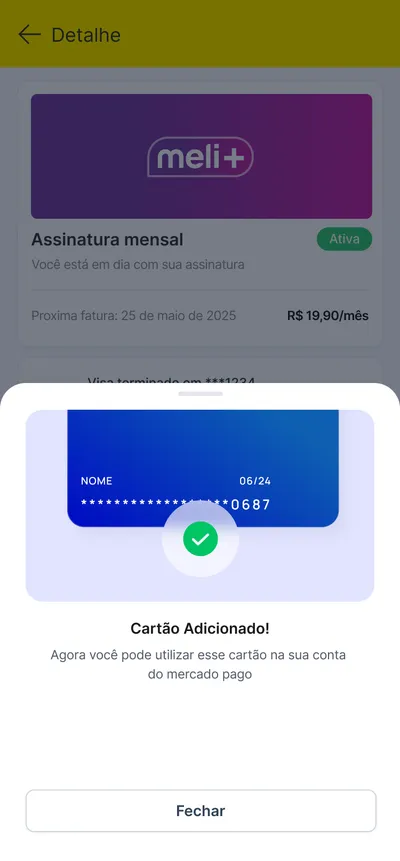
- 04Added
The card is added to the Mercado Pago account, ready for Meli+.
05 / The whole journey
Every screen, in order.
The Figma board lays the journeys out in lanes: a goal for each lane, a chip for each step, and a cyan connector from each tap to the screen it opens.
Fewer involuntary cancellations from failed payments [1.0]
E-mail [1.0]
Email aberto [1.0]
Central [1.0]

Modal [1.0]
Detalhe [1.0]
Modal [1.0]
Cartão adicionado [1.0]
Alterar cartão [1.0]
Deletar [1.0]
Sucesso [1.0]
Fewer involuntary cancellations from failed payments [2.0]
E-mail [2.0]
Email aberto [2.0]
Central [2.0]

Modal [2.0]
Detalhe [2.0]
Full page [2.0]
Cartão adicionado [2.0]
Alterar cartão [2.0]
Deletar [2.0]
Sucesso [2.0]
How to add a new credit card [3.0]
Sheet [3.0]
Scan [3.0]
Scan OK [3.0]
Form [3.0]
Sucesso [3.0]
What I would measure next
Fewer cancelled by a failed charge.
More who choose a plan.
The proposal stops at the design. The next step is to measure it: the share of subscribers with a backup card, involuntary cancellations before and after, and how many people who open the landing choose a plan.
Next project · TWO ↗︎
Start a conversation
Let’s talk about your product, your team, and where design can create the most value.
- Call duration
- 20-30 minutes
- Topic
- Design engineering
- Price
- Free